Tips & Resources · Updated
Hardcoded vs. Soft Subtitles
A clear way to distinguish viewer controls, subtitle tracks, and words that have actually been rendered into the picture.
FigCraft is a free, open-source interface design app built in Rust. It lets you create screen layouts, reusable components, vector graphics, and interactive prototypes, with files stored locally and no account required for offline editing. It also exposes commands through a CLI and an MCP server, making it interesting to developers who work with AI coding agents.
RemoveText.video · Published · Updated
There is one important catch: two unrelated products currently use the FigCraft name. The open-source design editor from the ArtCraft team is not the same product as FigCraft AI at figcraft.ai, which focuses on AI-generated images and videos. This guide explains both, then walks through what the design editor can actually do—and where its early alpha version still falls short.
The open-source FigCraft is an interface design and prototyping tool developed by the ArtCraft team. It aims to offer a familiar alternative to Figma: a canvas for arranging screens, a layers panel for organizing objects, and editing controls for layout, type, color, components, and interactions.
Unlike a browser-first collaborative design service, the desktop app uses a native Rust engine and saves projects as .figcraft files on your computer. Its code is available under MIT or Apache-2.0 licensing. You can design offline, inspect the source code, and use the editor without signing up for a hosted account.
That makes the project appealing, but it does not make it a complete Figma replacement. FigCraft is still in alpha, and the maintainers explicitly warn that real-world compatibility and teamwork features need more testing. Think of it as a promising working editor, not a risk-free migration path for an established design team.
Three aspects help explain the interest around this young project.
First, it takes on a familiar, demanding workflow: interface design. A free editor with auto layout, reusable components, prototypes, and developer handoff is more compelling than a simple drawing canvas.
Second, its local-first approach gives individuals a way to create and save designs without depending on an account or an always-on connection. Sharing is optional rather than a requirement for basic editing.
Third, the editor is programmable. Its graphical interface, command-line tool, and MCP server use the same command system. That opens the door to agent-driven tasks such as creating layouts, changing properties, or exporting assets. It does not mean an AI agent automatically produces production-ready designs, but it gives developers a concrete system to experiment with.
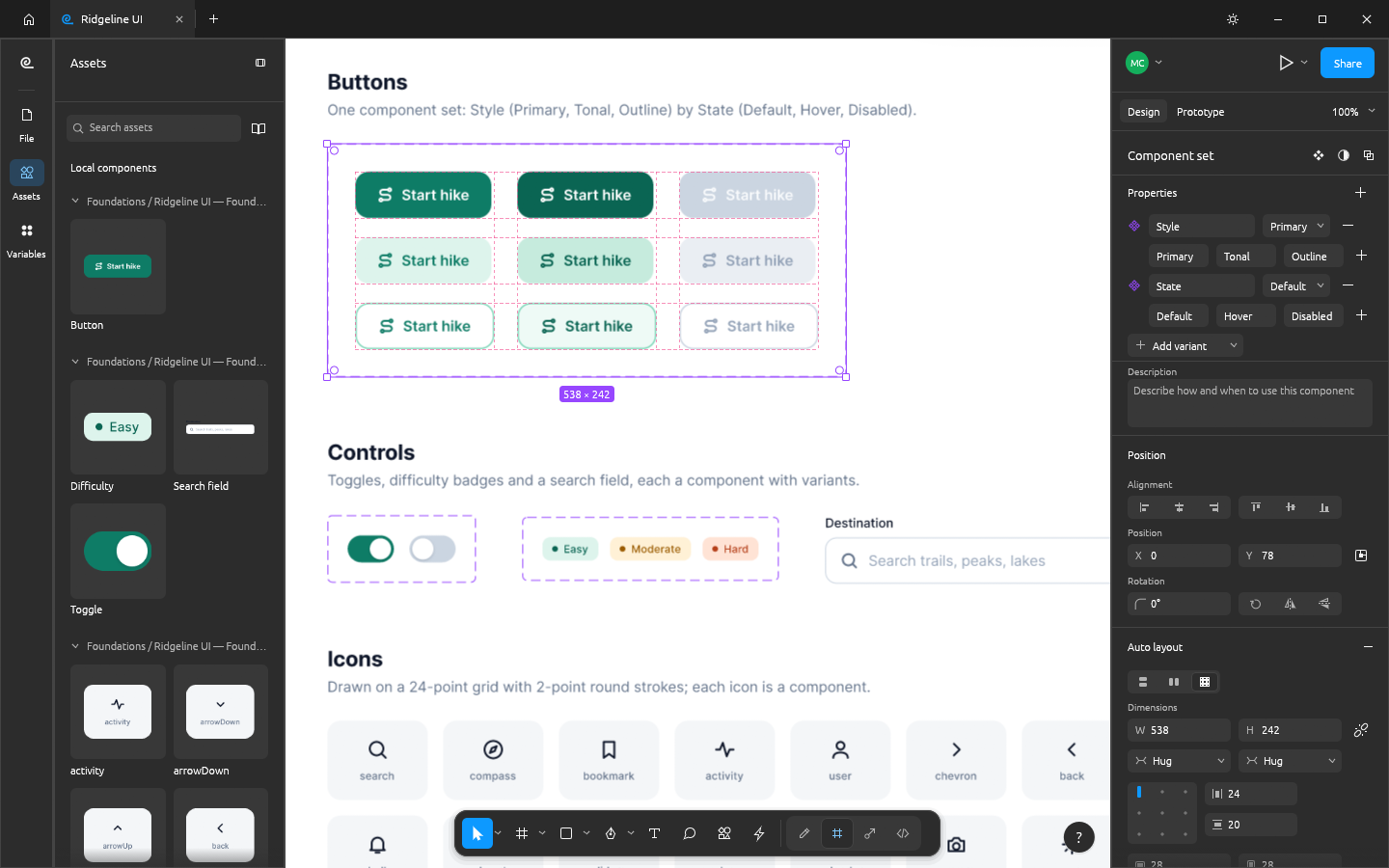
You can arrange frames horizontally or vertically, control spacing and padding, and use layout behaviors such as Hug, Fill, and Fixed sizing. Grid and wrapping options help when a screen contains repeated cards or sections. For example, a designer could create a settings page where button rows and content blocks resize without manually repositioning every item.
The editor supports main components, instances, variants, and overrides, alongside shared styles and variables. That matters when a project contains dozens of buttons, cards, or form fields. Instead of correcting each screen separately, you can work from a shared component and keep the visual language consistent.
Variables can also support different modes, such as light and dark color themes. This is useful for exploring alternative appearances without duplicating an entire interface.
FigCraft includes vector editing, shape operations, gradients, shadows, masks, and typography controls. These features help with icons, simple illustrations, branded UI elements, and the small details that turn a wireframe into a more realistic product concept.
You can connect screens, define interactions, and preview flows before an interface is implemented. The project also describes a Dev Mode for inspecting measurements, adding annotations, and generating code in formats including CSS, HTML, and React.
Treat generated code as a starting point to review, not a guarantee of production quality. Real applications still need accessible semantics, data handling, responsive testing, and maintainable components.
The editor can export assets in formats such as PNG, SVG, and PDF. It also offers an early form of live collaboration, including shared sessions and synchronized cursors. These are meaningful capabilities, although the collaboration system is still a preview rather than a fully established team platform.
If you want to try the open-source design editor, use the ArtCraft FigCraft page or the GitHub releases linked from its repository. Do not confuse these with the download page for the unrelated AI image-and-video app.
If you prefer a browser, the team also distributes a WebAssembly build, but the official downloads describe it as a build you can host yourself. Do not assume there is a permanent public web editor with all desktop features.
A useful first exercise: design a simple mobile profile screen, turn the primary button into a component, create a second state, and link two screens in a prototype. It tests layout, component reuse, and interaction design without putting client work at risk.
MCP stands for Model Context Protocol, a way for compatible AI tools to interact with external systems. The open-source FigCraft project exposes a command interface that AI agents can use to inspect or change designs.
According to the project's documentation, its CLI can run in MCP mode:
figcraft-cli mcpYou must first install the appropriate FigCraft command-line build and configure your MCP-capable client to launch it. The official MCP documentation is the right reference because setup details can change quickly.
A practical use case is asking a coding agent to create a layout, export a preview, and revise spacing after you review the result. The design remains editable rather than being only a generated screenshot. Still, automation needs supervision: inspect text, spacing, contrast, and component behavior before treating an output as finished.
Solo developers and indie makers. Sketch a landing page or app screen before writing frontend code. Reusable components are particularly useful when you are testing several product ideas.
Design students and learners. Practice frames, auto layout, variants, and prototyping without committing to a subscription. Because the project is young, expect interface changes and occasional bugs along the way.
Open-source enthusiasts. Explore how a native Rust design engine works, contribute fixes, or build automated workflows around its command system.
Small teams experimenting with local files. Test a review or collaboration session on noncritical material. Keep independent backups and validate the sharing method before exchanging sensitive designs.
For agencies with mature Figma libraries, extensive plugins, or client files that must import perfectly, the current trade-offs are substantially different.
Both products address interface design, but they are not interchangeable today.
| Area | FigCraft | Figma |
|---|---|---|
| Pricing and source | Free, open source | Proprietary product with free and paid plans |
| Everyday editing | Native desktop editor with offline files | Established collaborative design platform |
| Components and prototypes | Core workflows available; still in alpha | Mature production workflows |
| File exchange | Native `.figcraft`; `.fig` compatibility is best effort | Native Figma workflows and established ecosystem |
| Collaboration | Early live-session preview | Established multiplayer and team features |
| AI/developer workflows | CLI, command API, and MCP support | Its own evolving developer and AI integrations |
If you are creating a new personal project, the open-source option may be worth a trial. If you must exchange complex design documents with clients tomorrow, verify every required operation before considering a switch. In particular, opening a `.fig` file is not the same as preserving every component, effect, and prototype connection correctly.
No. The shared name causes confusion, but the products have different developers and purposes.
| Area | Open-source FigCraft | FigCraft AI |
|---|---|---|
| Main purpose | UI design and prototyping | AI image and video creation |
| Project website | getartcraft.com/apps/figcraft | figcraft.ai |
| Typical output | Interface files, assets, prototypes | Generated or edited visual content |
| How it works | Rust editor with local design documents | Local creative agent using AI models and a visual workflow |
| Cost model | Free open-source editor | Free app download; model generation can use paid credits |
FigCraft AI describes an agent that can plan visual tasks, connect nodes on an infinite canvas, and generate images or videos. It says local assets remain on your computer, while prompts or reference images needed for online generation are sent to the selected model provider. The company behind figcraft.ai published an official name clarification on October 15, 2026, stating that it is not affiliated with the newer open-source interface editor.
So if you searched for “FigCraft video generator,” the AI creative app is probably the product you want. If you searched for “FigCraft Figma alternative,” you are likely looking for the open-source design editor. Always check the developer and website before downloading either one.
The open-source FigCraft discussed in most of this article is not a video editor or a video text remover. FigCraft AI is a separate product that supports AI video creation and editing, but that does not establish that it offers a dedicated tool for removing words already burned into video frames.
For your own or authorized footage, the cleanest solution is usually to return to the source project and remove the original caption or title layer before exporting again. If only a finished video remains and the text has become part of the image, the task is different: you may need to crop, cover, or reconstruct the affected pixels. See our explanation of hardcoded versus soft subtitles to check which situation you have.
If you need to clean unwanted embedded text while preserving the frame, RemoveText.video provides a dedicated workflow for selecting and reviewing text areas in authorized video clips. Results still depend on background detail and motion, so check the complete output before publishing.
The main limitation is maturity. The project describes its interface editor as alpha software, and several capabilities are still being refined:
.fig files is best effort, not a promise that complex documents will open accurately.These limitations do not make the tool uninteresting. They tell you how to evaluate it fairly: experiment with copies of your work and measure whether the features you need actually behave as expected.
The ArtCraft team's open-source design editor is free to download and use. It is licensed under MIT or Apache-2.0. The separate FigCraft AI product has its own generation-credit model, so do not assume all AI image or video generation is free.
Yes. The open-source editor offers downloads for macOS and Windows, along with Linux and other builds. Always select the package that matches your operating system and hardware.
It has experimental, best-effort .fig support. Test a copy of the document and review components, text, images, and interactions before relying on the result.
Not for basic local design and saving. Online collaboration, external services, and any connected agent workflow may have additional requirements.
The open-source UI design editor is primarily an interface design application with agent-accessible commands. AI image and video generation is the focus of the unrelated FigCraft AI product at figcraft.ai.
The design editor provides a CLI and MCP server for compatible agent tools. Installation and client configuration are required, and you should verify generated designs manually.
For limited personal workflows, it may already be useful. For teams that depend on robust file exchange, plugins, and established collaboration features, its current alpha status makes a full replacement premature.
FigCraft is worth watching because it combines a familiar interface-design workflow with an open-source, local-first architecture and agent-accessible commands. The interesting question is not whether it can imitate Figma's menus; it is whether it can reliably handle the real files and collaboration habits designers depend on.
Start with a small, noncritical project, save your work locally, and judge the results for yourself. And remember the naming distinction: FigCraft the design editor and FigCraft AI the video-and-image agent are separate products serving different needs.
Tips & Resources · Updated
A clear way to distinguish viewer controls, subtitle tracks, and words that have actually been rendered into the picture.