Guide · Updated
Remove Text in After Effects: Masks & Content-Aware Fill
Build a controlled Content-Aware Fill repair, choose the fill method, and diagnose masks, outlines, and unstable results.
To remove text in Premiere Pro, start with the item that creates it. A separate title can be deleted or edited. A caption track can be excluded from your export. Words already rendered into an imported video need a clean source, a deliberate cover, or image repair.
RemoveText.video · Published · Updated
Open the original project if you have it. Importing a finished MP4 does not recreate the text layers that existed before export. This guide covers Premiere on desktop; panel names and available controls can differ in older versions.
Duplicate your sequence, move the playhead to a frame containing the words, and inspect the tracks above the footage. Temporarily disable the suspected graphic or caption track, then check the picture. Restore unrelated tracks after the check.
| What changes? | What you probably have | Next action |
|---|---|---|
| Disabling a graphic removes the wording | An editable title or graphic | Edit the wording or remove the responsible element. |
| Disabling a caption track removes the words | Separate captions | Edit caption segments or exclude captions at export. |
| Words remain inside an imported clip | Burned-in text, or text inside a nested source | Inspect the nest or obtain a clean source before repairing pixels. |
| Words appear only in the exported file | Caption export settings or an export overlay | Inspect the export settings and preset. |
The Text panel contains a separate trap: Transcript is not the same as Captions. In Text-Based Editing, deleting transcript words can remove the matching media and ripple the sequence. Use the caption segments when your goal is to keep the speech and picture while removing visible subtitles.
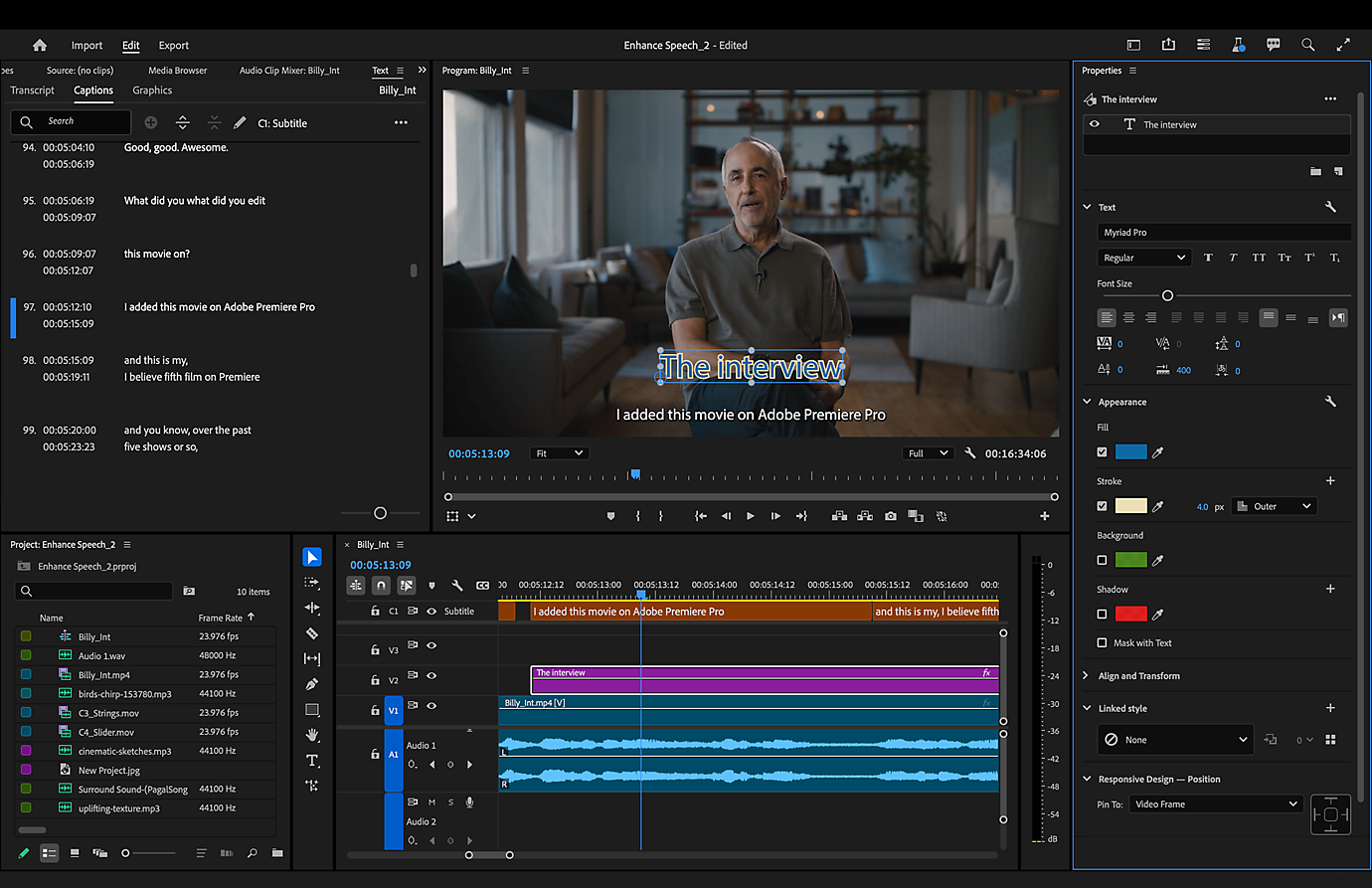
A title may be one simple graphic clip, or one layer inside a larger design. That distinction matters if you want to keep a colored panel, icon, or animation.
Adobe moved many former Essential Graphics editing controls into the Properties panel from version 25.0 onward. An older tutorial showing Essential Graphics may therefore describe the right task in a different interface.
For example, when an interviewee's job title changes, update that text in the original graphic. Reconstructing the pixels behind a nameplate adds work that the project does not require.
To remove text in Premiere Pro when it comes from a caption track, work with the caption segments in the sequence. Select only the segments you no longer need, delete them, and inspect the rest of the track. Another language or caption pass may sit on a separate track.
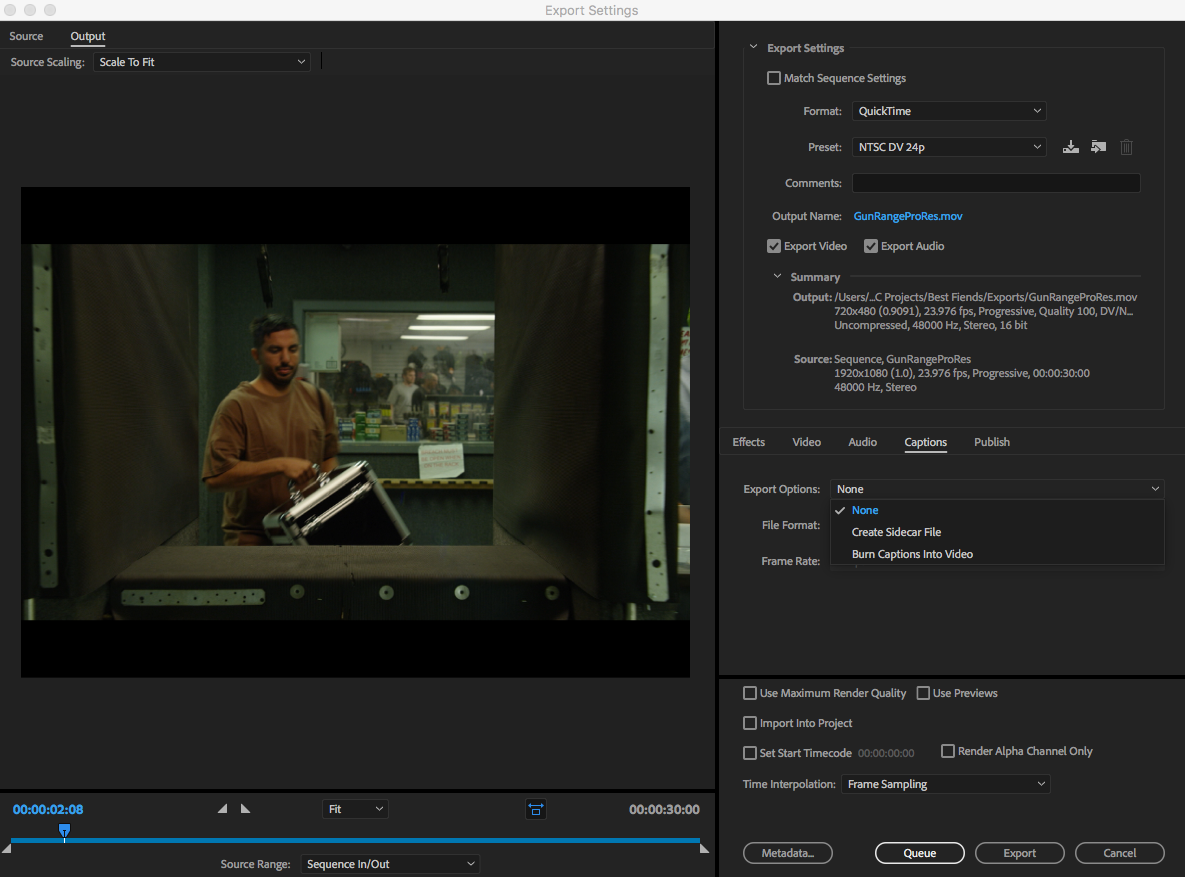
If you need both captioned and clean deliveries, keep the captions in the project and configure the export instead. Open Export, find Captions, and choose None where available. Adobe's export settings reference distinguishes this from Burn Captions Into Video and Create Sidecar File. The choices depend on your selected format.
Export a new file and play it outside Premiere. Merely turning off a display while editing does not establish what the delivered file contains. Also, choosing None cannot erase captions already present in the source image; it only controls separate caption data in the sequence.
If disabling every relevant graphic leaves the lettering visible, open any nested sequence before concluding that it is permanent. A nested edit may still contain the original title. If the source is genuinely flattened, ask for a version without text.
With no clean source, choose according to the shot:
A mask controls where an effect or layer appears; drawing one does not restore the hidden background. See the crop, cover, and repair comparison before spending time on a method that cannot meet your delivery needs.
If you already use After Effects, Premiere's Replace With After Effects Composition command provides a Dynamic Link route. Content-Aware Fill belongs to the After Effects workflow. Follow the After Effects text-removal guide for its masks, analysis, and review steps.
When you cannot remove text in Premiere Pro as a separate element, an external cleanup can supply a revised video clip. Start with a short representative export that includes the difficult moment, such as a hand crossing the lettering. Use footage you own or are authorized to edit.
Opaque caption backgrounds hide more of the scene, and decorative lettering may leave outline remnants. Moving text must remain inside the selected areas. Watch faces, fingers, edges, and textured surfaces for unintended changes; keeping the frame does not guarantee an invisible repair. The site's actual moving comparisons show what to inspect.
Place the reviewed clip at the same sequence position. Cleanup re-encodes the video, so do not assume an identical duration or audio-track structure. Compare its first and last frames, duration, frame rate, color, and sound sync with the original. Keep one intended audio source active so you do not accidentally double the dialogue. Add any replacement title as a new editable graphic, after the cleaned picture has passed review.
The final check matters whenever you remove text in Premiere Pro. Reopen the actual delivery file and inspect every place the text used to appear, including transitions and the last frame of a title.
If the timeline looks clean but the output does not, check:
Keep the project, original media, and a clearly named clean export together. The next wording change is much easier when the title remains editable.
Yes, when the words are separate titles or captions. Cropping and covering also work within Premiere when their visual tradeoffs are acceptable. Burned-in text that needs reconstructed background is a different task, and the result depends on the shot.
The lettering may be part of the imported image, inside a nested sequence, or controlled by a template. Inspect the source before applying a cleanup effect.
It excludes separate sequence captions; it does not change words baked into the picture. If you only have an MP4 and need to inspect its subtitle streams, use the MP4 subtitle-removal guide.
Guide · Updated
Build a controlled Content-Aware Fill repair, choose the fill method, and diagnose masks, outlines, and unstable results.
Guide · Updated
Check external subtitle files and embedded tracks, make a copy without subtitle streams, or handle burned-in words.